AI Terminal · installed and supported
A workstation at your desk. A person who keeps it working.
This is the full lab, working for your business. We install a dedicated AI workstation in your office, build the business plan around the projects you want to win, build the tools to deliver them, and support it all every month. One price covers the device, the planning, the tools, the help, and model usage up to an allowance we agree with you.
Leased, not sold. Scope, usage allowance and lease terms are agreed in writing before we install.
01What you get every month
The device is the smallest part of it.
We are a full-service AI lab, not a document service. Reading a tender package is where the work starts. When a project is worth chasing, we sit down with you and build the business plan around it: what it takes to win, who you need alongside you, what it costs to deliver, and what it will earn. Then we build the tools that carry the plan.
-
The device
Installed and maintained
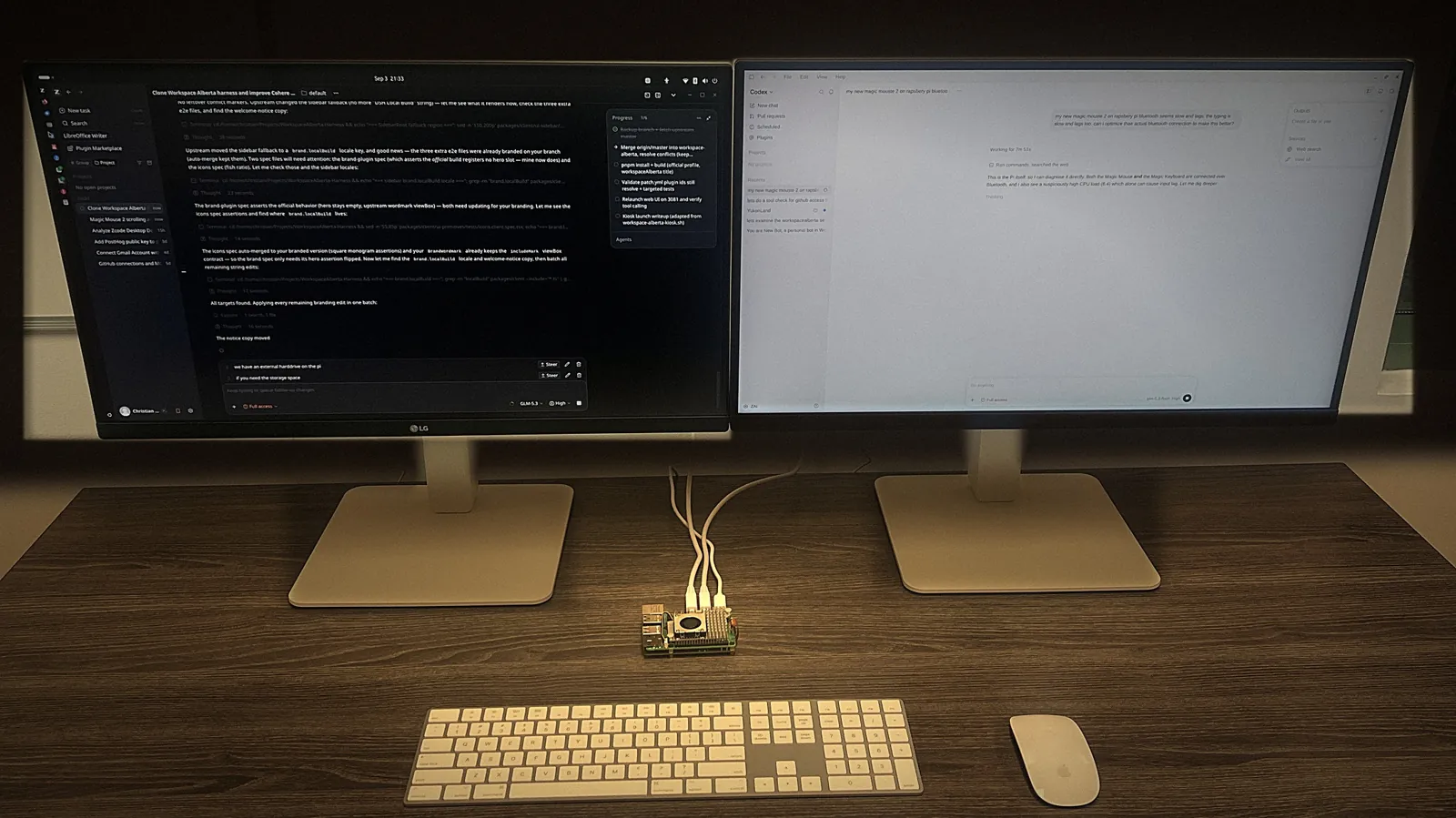
A Raspberry Pi workstation, built in Alberta and set up at your desk on your network. We own it, update it and maintain it. Screens and peripherals are agreed at scoping.
-
The plan and the tools
Built around your projects
Business plans for the projects you want to win, written with you. Tender search and review with workspaceAlberta Pro from day one. Then the tools on your list: quote prep, paperwork, reports, a new line of work.
-
The help
Someone in your corner
You work directly with the founder, Christian Cooper. Get stuck and we join you on the device over a private, permissioned connection and build with you.
Model costs, stated plainly
Model usage for your tools is included up to an allowance we agree before install. If a project would need more, we quote it before we run it. We choose models per tool and tell you which providers each one uses; Cohere, a Canadian provider, is our default where it does the job.
What the price replaces
- Hours each week spent finding and reading tenders
- Tools someone set up once that nobody maintains
- Ideas that never get built because no one has the time
- Paying by the hour every time something needs fixing
02Onboarding
From the first call to tools you use every week.
- Scoping call. We go through the work you want help with and agree the first projects, the usage allowance, who on your team uses the terminal, and how often we check in.
- Written scope and lease. Price, allowance, support access, lease length and equipment return are written down before anything is installed.
- Install day. We set the workstation up at your office, connect it to your network and the accounts you choose, connect workspaceAlberta Pro, and walk your team through it.
- First tools. We build the first tools with you on the device and adjust them until your team uses them.
- Every month after. New tools as your list grows, fixes when something breaks, and help when you are stuck.
Things you can bring to it
- “Find the public work that fits us, every morning.”Tenders
- “Read this tender package and tell me if we should bid.”Bids
- “Turn my site notes into a quote I can send.”Quotes
- “Pull last month’s jobs into one report.”Office
- “This project could change our year. Build the plan with me.”Business plan
- “I have always wanted to sell this as a service.”New work
Big ideas and small annoyances both belong here. You keep running the business.
03What we can change remotely
Your terminal changes as your business does.
With your permission, we can
- Add or change tools and automations on the device
- Connect folders, inboxes or software you approve
- Schedule jobs, such as a morning bid brief or a weekly watchlist summary
- Tune the business profile used to match you to tenders
- Update software, models and instructions
- Fix what breaks
We can’t, and won’t
- Connect when you have switched access off
- Open accounts you have not connected
- Submit bids, send email or pay for anything on your behalf unless you set that up and approve it
- Use your sessions as training data without your permission
- Watch the device continuously; we connect when you ask or in agreed maintenance windows
04How support reaches your terminal
A private connection, and you hold the switch.
Your terminal joins a private network run with Tailscale. Every connection on it is encrypted end to end with WireGuard, and Tailscale’s access rules decide which machines may reach your terminal. No port on your network is opened to the public internet for us to get in.
We connect when you ask, or in maintenance windows you have approved. Switch the connection off and we cannot reach the terminal. Your files and projects stay stored on it either way.
05Working examples
Tools that are running today.

-
Tender package to bid/no-bid brief
A live Sylvan Lake road tender worked through: the package, a mandatory-requirements checklist, and a caution call with the two things to confirm first.
-
Morning bid brief
A short list of live postings that fit your profile, plus what closes next. On a terminal it runs on a schedule and is waiting when you sit down.
-
Watchlist with countdowns
The postings you are chasing, sorted by closing date, with days left and your notes.
-
The harness itself
In the photo above, the terminal’s agent is merging an update into its own workspaceAlberta harness and checking off a six-step plan.
06Price
One monthly price.
C$10,800
per month, plus applicable tax · leased
Start the lease once we have agreed your scope in writing. Equipment returns when the lease ends.
Included
- Business plans built with you around the projects you chase
- The leased workstation, installed at your office
- Installation and onboarding for your team
- workspaceAlberta Pro and our hosted services
- Model usage up to the allowance agreed before install
- New tools and changes within the agreed scope
- Updates, maintenance and remote support over Tailscale
Not included
- Software subscriptions you already pay for
- Work outside the agreed scope, which we quote first
- Model usage above the allowance, which we quote first
Questions
Do I own the device?
No. The workstation is leased and returns to us when the lease ends. How your files and the tools’ outputs are handed over is agreed in writing at scoping.
What happens if the internet goes down?
Files and projects on the terminal stay available. Tools that call hosted services or cloud models wait until the connection is back. See what runs where.
Is it only for public tenders?
No. Tender search is the first working connection. Bring the small things you always wished worked, steps you never had time to fix, and ideas you have never started.
Are my sessions used to train models?
Not automatically. Any reuse of customer sessions needs your permission and a review. Local deployment does not mean every model call stays on the device; we tell you which providers each tool uses.
How long is the lease, and how do I end it?
Lease length, notice and equipment return are agreed in writing at scoping, before anything is installed.
Who is the terminal for?
Owners of Canadian trades, supply and industrial businesses who want their own tools built and kept running, without hiring a developer to do it.